Are you bored of the same old login screen of windows 7

Follow the following steps and change the background wall
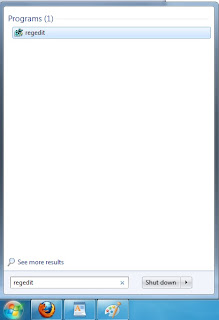
Step 1 : Press 'start' . Type 'regedit' . Press enter .
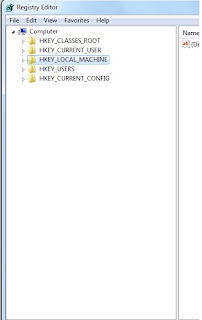
Step 2 : Now browse to 'HKEY_LOCAL_MACHINE\SOFTWARE\Microsoft\Windows\CurrentVersion\Authentication\LogonUI\Background ' .
Step 3 :You will see ' OEMBackground ' . Right click on it and select ' Modify...' . Change the ' Value data ' from 0
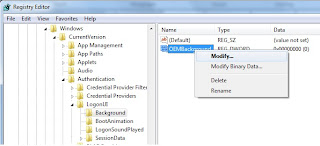 to 1 . ( Note: it’s possible that OEMBackground doesn’t exist on your system; if this is the case, adding a new DWORD value with the name of OEMBackground will fix things.)
Step 4 : Now open windows explorer and type ' %windir%\system32\oobe ' . Press enter.

Step 5 : Inside oobe folder create a new folder and name it as info (all lowercase). Inside info create a new folder and name it as backgrounds (also lowercase) .

Step 6 : Now save your favorite wallpaper in this folder. It should be in .jpg format only and less than 245 KB in size (if the size exceeds it will not work). Name this image backgroundDefault.jpg .
Step 7 :Now restart and see the change.

Follow the following steps and change the background wall

Step 1 : Press 'start' . Type 'regedit' . Press enter .

Step 2 : Now browse to 'HKEY_LOCAL_MACHINE\SOFTWARE\Microsoft\Windows\CurrentVersion\Authentication\LogonUI\Background ' .
Step 3 :You will see ' OEMBackground ' . Right click on it and select ' Modify...' . Change the ' Value data ' from 0

Step 4 : Now open windows explorer and type ' %windir%\system32\oobe ' . Press enter.

Step 5 : Inside oobe folder create a new folder and name it as info (all lowercase). Inside info create a new folder and name it as backgrounds (also lowercase) .
Step 6 : Now save your favorite wallpaper in this folder. It should be in .jpg format only and less than 245 KB in size (if the size exceeds it will not work). Name this image backgroundDefault.jpg .
Step 7 :Now restart and see the change.

